
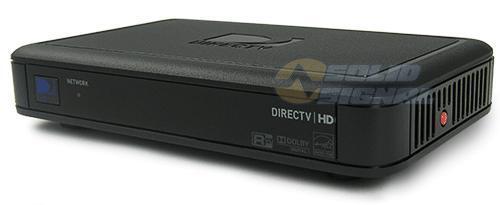
No question about it… here at the Solid Signal Blog we’re huge fans of the tiny DIRECTV Genie Mini Clients. They’re perfect for guest rooms, bedrooms… anywhere you want true DVR functionality without size and noise. They’re wired and wireless, whichever you need, and all of them support RF remotes that let you mount them behind the TV. They’re so good that the hardware has barely changed in a decade. Why? Because honestly there’s no reason to change anything. With great reliability and totally silent operation, they “just work.” What’s not to like?
But yes, there have been updates
About every three months or so, the Genie clients get updates. For the most part there’s nothing you’d notice. It’s usually about adding a tiny bit more reliability or making sure that they are compatible with the latest Genie DVR software. Remember that the clients are essentially very simple adapters. The Genie DVR does all the work and simply delivers video and audio to the clients. So, any big changes would happen in the client software.
The last really giant change to the Genie software was about five years ago, but there have been a lot of behind the scenes, incremental changes since then. There was a lot of uproar over the last software update, and so the rule for the last five years has been, “if it ain’t broke, don’t fix it.”
But what if you want to stay up to date?
For techies, though, part of the fun is keeping the equipment up to date. Although we’ve advised you in the past not to force-download software for DIRECTV receivers and DVRs, some folks still do it. As long as you know the risks, that’s just fine. But these same folks are a little stymied when they get their Genie Mini Clients, because the same codes used to download software for their DVRs doesn’t seem to do anything.
Genie Mini Clients get their software in a completely different way. Because clients get all their information straight from the Genie DVR, they don’t have a direct satellite connection. So, software for the clients goes to the Genie DVR and then is pushed to the clients. This means it can happen very quickly — 3-5 minutes as opposed to 20 minutes or so for most DIRECTV equipment — and it happens automatically. If you happen to notice the DIRECTV logo on your client flashing… that’s a software download.
There’s nothing you can do to force it, though. Downloads come to you automatically, like they do for other DIRECTV equipment, but sorry to say, you’ll just have to wait for them. The best you can do is scour your receiver’s recording history looking for “Software Download” and if you see that, expect your client to be updated within about 4 hours if you’re not using it.
Ready for a new client box?
After years of stability, we are finally seeing some new Genie hardware. Solid Signal is your source for the new Gemini and all the DIRECTV hardware you’re looking for. Not sure what you need? Call the experts! We’re here for you during East Coast business hours. We have a team of real DIRECTV techs in our offices. They even answer the phone! Check it out for yourself… call [email protected]. If it’s after hours, fill out the form below. We’ll get back to you, usually within one business day.


Be the first to comment on "Do you need to force an update on Genie Mini Clients?"