

If you are seeing an overly blocky picture like the one above or if you see random blocks of green or pink appearing through your picture, there are some things you can try immediately to try to fix the problem.
Thank you for asking us for more information about why your picture is breaking into squares and pixels and how to fix it. This problem may be caused by bad weather (this is known as “rain fade”), trees or branches blowing in the line of sight of the receiver, or water pooling on your dish (in areas where dishes point more or less straight up.) It can also be caused by loose connections or bad cables, but before you take extreme steps, it’s best to check “the easy stuff” first.
Reset your receiver.
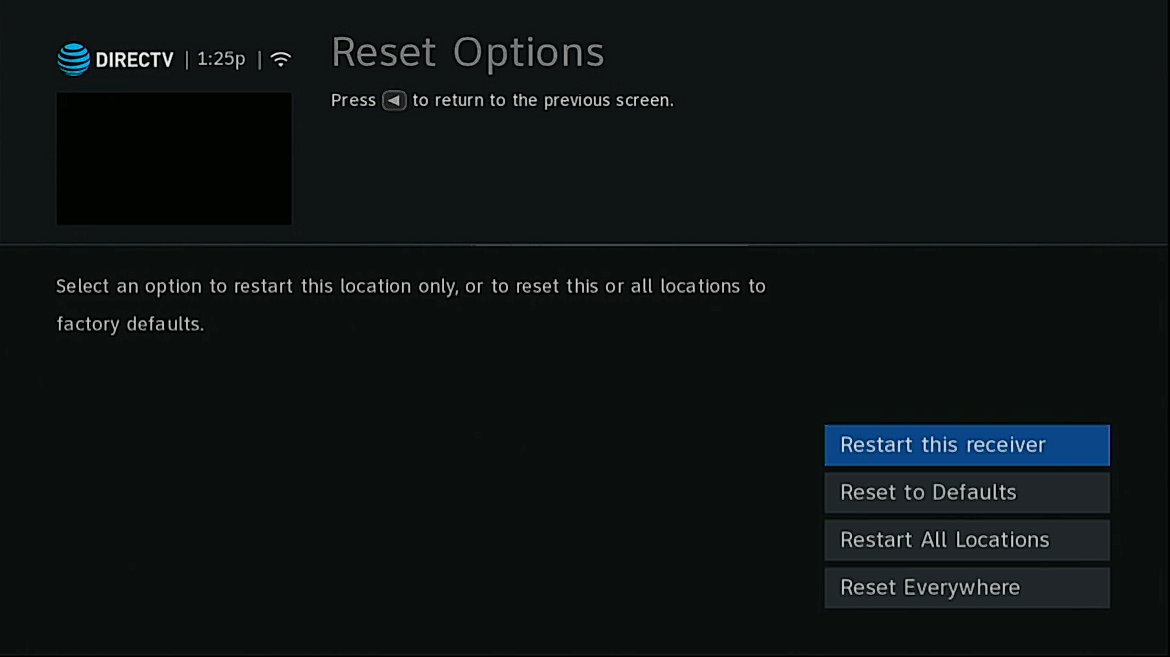
There are three ways to do this:
-
Press MENU then go to Settings, then Reset Options. Choose Restart all Locations. (If you have an older receiver, you will need to press MENU then go to Settings&Help, then Settings.)
-
Find the red reset button and push it. It’s usually behind a spring-loaded door on the front of your receiver.If you have a Genie, you will need to do this on the main DVR not on the client.
-
Unplug your receiver (or Genie DVR) for at least 15 seconds then plug it back in.
If none of these work you may consider unplugging the receiver for at least two hours. While it’s not completely clear why this helps (some say that the DVR still has current flowing through it for a long time) it does often help. There’s an excellent tutorial for Genies here, and one for older receivers here.
Check for obstructions
You should be able to see whether or not a tree or branch is blocking your receiver. Draw an imaginary line starting at your dish and following the center arm that juts out. If it looks like there are trees or branches anywhere nearby you may need to trim them or hire a professional to do it or you.
Check the dish
Look at the dish itself. Is water pooling on it? Is there snow or ice on it? That can be common in the winter months. Make sure your dish is free of rain or snow by gently wiping it clean. Normal dirt should not be a problem.
If those things don’t work for you, you may wish to look at your signal strength. Press MENU then go to Settings, then Satellite, then View Signal Strength. There are options there for checking signal strength. Check every satellite by pressing SELECT with the “+” highlighted next to the satellite number. It is normal to see zeroes but any number that is higher than 0 should be at last 75. If you see lower numbers than that, your dish may need to be reaimed.
What if none of these things helps?
Sometimes the issue isn’t with you. If everything looks good with your signal strengths, it’s very possible the problem is in the broadcast facility. In 2019 there was one incident where several channels were pixelated for several hours in the middle of the night. There was nothing that DIRECTV customers could do but wait. The problem eventually fixed itself. That’s the best thing about satellite service, by the way: problems tend to fix themselves. It’s pretty rare you need to get a tech out to fix anything.
If you do think you need new equipment, cables, or accessories, you can get the best stuff by shopping at Solid Signal.
Original image courtesy of Barry Blanchard.





I have direct TV and internet that both come from one connection in the wall. So there is a splitter. If I have my wireless modem plugged in, my direct tv is pixelated and you cant watch anything, if I unplug my wireless router everything is perfect. Tech support is baffled, and told me to reverse the wires. That didnt work. Any idea how to solve this? Its through Blomberg in Gull Run Apts, in Kalamazoo, MI
I want to know more about this system. Satellite tv and internet doesn’t usually travel on the same wire unless you’re in an apartment. Are you?
Yes we are in an apartment, I have a Arris Surfboard that I purchased new when we moved here in 2019.
Sounds like weak shielding on the cable. But with apartment systems they are all different.
The only way for us to have the internet on is to switch our hdmi to go to apple tv or amazon prime. I havent done a firmware update on the wireless modem. This place has been around since the 80s, I highly doubt they’ve updated much of anything. If you have a suggestion, that I may be on direct tv and have the wireless in the background I would be thrilled
The best thing would be for the contractor who handles your buildings to and internet to run you a new line that is internet only. They are the only ones who can do that.
Thank you, I will share this with them, but its all about money. We can do Netflix when we want the internet to work, and when we want something on direct tv we will disconnect the modem
On our 2 smaller tv’s, the problem we have is only with one channel. Its no pixelated, but the right side of the screen is bars of colors, about a fourth of the screen and so you can’t see the whole picture. Its fine on the larger screen. It happens only on the Marquee channel. Any thoughts?
Have you tried changing out the HDMI cable?
2022-2023, — in 2022 the pixeling on my Directv service was terrible but only on the Local Channels, which I pay an extra fee to receive. I did everything, following all of the procedures and calling service and following their “repeat” procedure, but nothing, will the problem existed. So, out comes a service tech. This service tech, from Directv, comes in, looks at the simple set up, and then tells me that this is an ongoing problem on Directv end, and they are working on it — working on it, and why didn’t the service on the phone just tell me this and save time? The Tech they sent out, did nothing but tell me, “They are working on it”. From what I can see, they have been “working on it” for years. Not the end of the story —
2023, same problem, with a twist — now the pixeling is minimum but now the screen goes black and the sound cuts out — sound familiar? Crazy, how the screen and sound click out right at the most exciting times, or when a character in a mystery is about to reveal the truth? So, I call tech, go through all of the suggested procedures, and it is agreed that a Tech should pay us a visit. This time, different Tech guy, but same results. He checked everything, even rebooting, and changed out a part that he said was old, on the Dish horn. Then he told me the same thing the previous Tech told me — the problem is known and being worked on at the other end, at the transmission end and all of the home equipment, that I have, is fine. This is some kind of game they are playing. I am searching for other, better, way to get my local channels and be able to record and play back. Yes, I have tried the roof mount solution, but they can be as troublesome or more so. Still waiting for a streaming service you can record for watching later. You see, there is nothing really any better available, and so, Directv, and Dish have not worries — but it is this kind of thing that will lead to their demise. But, wait, I believer the Cable and the Satellite services are all shifting to direct streaming, and cloud record service. We are about to drop them .. Signed, Fed up in California.