
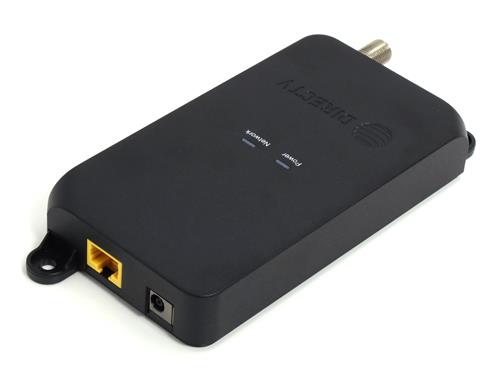
Take a look above. This is the new GigE DECA. It’s designed for commercial DIRECTV installations that need networking over coax. For example, it can be used in hotels or large bar installations. It’s a step above the regular residential DECA, in several ways.
Gigabit Ethernet
The GigE DECA uses gigabit Ethernet. Previous DECAs were limited to 100Mbps, even though information could travel down the coax line at 150-1750Mbps. While this really didn’t represent a problem for home users, commercial users need every bit of speed they can get.
The GigE DECA will work in MoCA 2.0 networks, so if you’re one of those lucky folks who is using a Genie 2 and C61 clients, it will give you even more speed: up to 500Mbps.
Industrial Design
The GigE DECA is designed to be mounted on a backboard with screw holes molded in. This may not seem like a big deal to you, but for larger commercial installs, this is really important. It just makes the difference between a nice clean install and a messy one.
Purchase options
At Solid Signal we offer the GigE DECA in two flavors. The base model includes just the DECA. This is the one to buy if you have spare EPS10 power supplies and network cables lying around. Commercial installers often do. However, for first-time users choose the entire kit which includes a short network cable and a power supply.
Using the GigE DECA on unused coax cable
If you have unused coax cable, you can use a pair of GigE DECAs to get 500MBps networking anywhere. Just connect one up to each end of the cable. The Ethernet connection on either side can go into a router or switch. This is a great way to make use of cable that wouldn’t otherwise be doing anything.
Commercial customers, we have what you need
The GigE DECA and other commercial-grade parts are available at SolidSignal.com! Check out the great selection, and find things you couldn’t find anywhere else!



The only problem is that none of Directv’s commercial hardware supports MoCA 2.0. Only the C61/C61K and HS17 do.
Isnt this also POE powered? At the DIRECTV Revolution last year they said it would also be POE capable?
I had heard the same but there’s no mention of it in the specs.
Sounds like I need to order one from you guys, that’s a pretty good price we get everything from p10 but that price isn’t much more then last gens model. Too bad p10 doesn’t even have it listed yet ?
It’s labled as POE capable on the back of the unit …
Have purchased three of them from Solid Signal as a cheaper alternative than the usual “D band” MoCA adapters to backhaul two WiFi APs to the main house switch where they appear to be working well.
And good luck finding someone else outside of S.S that sells these Giga DECAs, or even knows anything about them. DIRECTV tech. support is totally clueless even about their existence.
As I had just wanted to verify the meaning of the status LEDs, which unlike the common 10/100 fast ethernet residential DECAs. The Giga DECAs “Network” indicator LED glows a steady blue color when only two DECAs share a point-to-point link. But a solid green color when three of them share a three-way link.
I suppose it means the max. 500 gigabit/sec. link rate is effectively reduced by the need to share of it over three DECA nodes now. But just not sure and neither were the Signal Connect guys at S.S. really sure of that either.
It is POE I have ordered them from our DIRECTV Dist. and tested them. At first they did not know what I was asking for when I ordered them they are only for MDU clients but I was able to order them once we found out they were MDU DECAs
That’s a nice touch by the designers/manufacturer, indicating “TURBO” mode status. The multi-node (3+) shared throughput per channel for MoCA 2.x is 400 Mbps, but a 25% bump is gained in a “TURBO” setup where just 2 nodes are present. So, 500 Mbps for standard MoCA 2.0 (such as these adapters) or 2500 Mbps for a pair of Band D MoCA 2.5 adapters.
Bonded MoCA 2.0 or MoCA 2.5 adapters for Band E, bonding two or three channels, respectively, would be a boon.